
A Compact Dual-Tower Air Cooler
FSP has been known for making reliable power supplies, and if you’ve been building PCs for a while, you’ve probably used or at least seen one of their units. But now, they’re trying something new as they step into the CPU cooling space.
One of their new products is the MP7 ARGB Air Cooler. It’s a dual-tower design with a pretty clean look and decent specs on paper. But the big question is, should FSP stick to making power supplies, or do they actually have a shot at making coolers too? Let’s take a closer look and find out.
Specifications:
| CPU Supported Platforms | Intel LGA : 1851 / 1700 / 1200 (The installation method for 1851 is the same as for 1700) AMD : AM4 / AM5 |
| Dimensions (LxWxH) | 125 x 123.5 x 153 mm |
| HeatSink Dimensions (LxWxH) | 125 x 97.5 x 153 mm |
| Fan Dimensions ( L x W x H ) | 120 x 120 x 25 mm |
| Weight | 905 g |
| Heatsink Material | Aluminum Alloy |
| Heat-pipe | 6mm x 6PCS with Copper base plate |
| Fan Speed | 800 – 1800 RPM ( PWM ) ± 10% |
| Bearing Type | FDB |
| Static Pressure | 2.1 mm H2O ± 10% |
| Fan Air Flow | 76 CFM ± 10% |
| Noise Level | 32 dBA ± 10% |
| Rated Voltage | 12 VDC |
| Rated Current | 0.3 A |
| LED | ARGB |
Closer Look

The box comes with a color printed design with the image of the Air cooler at the front.

At the back are the specifications and some features of the MP7 ARGB.

Inside the box are the following; the User’s Manual, Screwdrivers, Thermal Grease, Mounting Brackets, Intel Backplate, Spacers and Screws.

And lastly, the FSP MP7 ARGB Air Cooler itself.


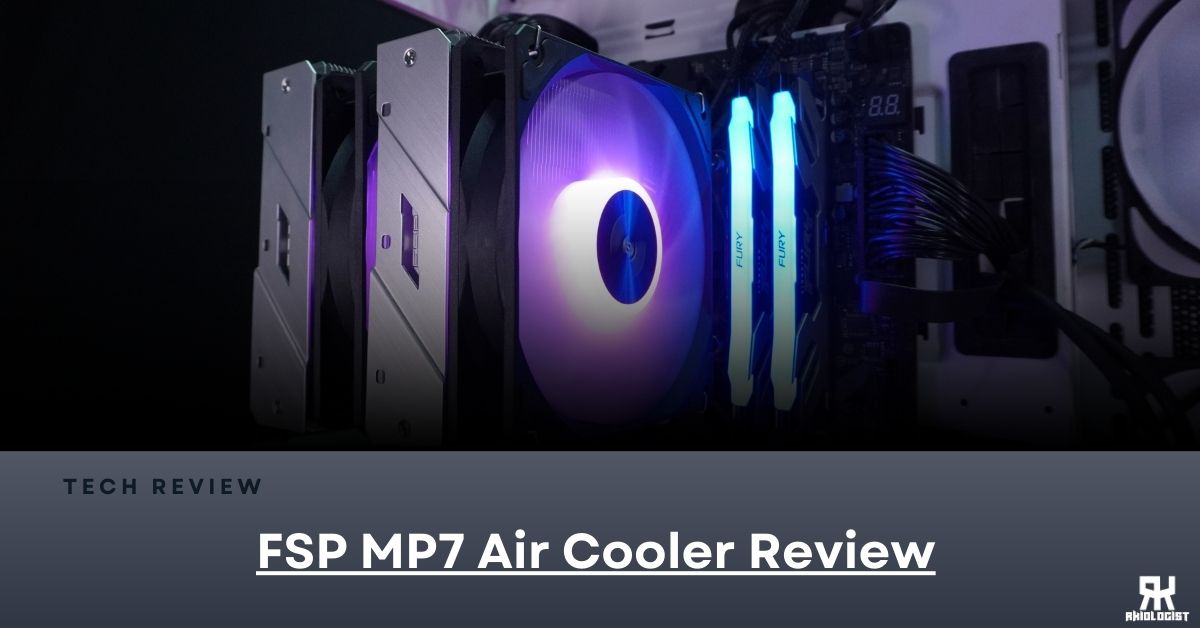
The FSP MP7 ARGB is a compact dual-tower air cooler with two 120 ARGB fans. The fins are not that dense, so it only needs high airflow fans.

At the top you will find some heatsink cover, which looks like a brush finish. It also hides the ends of the heat pipes. There is an FSP logo in the middle on both covers.

The second heatsink tower has a notch at the bottom to give space for the Motherboards I/O Cover or possible RAM clearance.

This air cooler has 6 heat pipes with a 6 mm diameter.

The base plate is made from copper with an alloy finish that covers the whole CPU’s heat spreader.

The fan included doesn’t have a name based on the spec sheet. But these fans are Fluid Dynamic Bearing (FDB) types with up to 1800 RPM fan speed and an airflow of 76 CFM. These are ARGB fans, so they can be controlled by your motherboard’s RGB software.

The fans can be controlled using the 3-pin ARGB Cable and the 4-pin PWM Cable.

The mounting bracket uses tension screws. So, you will know when to stop tightening it, and it provides consistent pressure.


When installing the MP7 ARGB to your motherboard. You don’t need to remove the fans, as there are dedicated holes that you can insert a dedicated screwdriver into to reach the screw and tighten it. Which really adds lots of convenience.
Benchmarks
For benchmarking, I will use Cinebench 2024 and HWiNFO64.
Here are the specs of the components I will use for testing.
Specifications:
ASRock Phantom Gaming Z790 NOVA WiFi
Intel i5 13600KF
Kingston Fury Renegade (CUDIMM) 48GB (24×2) 7200 MT/s
PNY GeForce RTX 4070Ti SUPER VERTO OC
Thermaltake Core P3 Pro Chassis
FSP VITA GM 1000W
Noiseblocker e-Loop X Fans
Results


Conclusion

The FSP MP7 ARGB has a good build quality. Everything looks well-built and doesn’t feel cheap at all. Because of this, you may think FSP has been making coolers for a long time. So, a thumbs up for your FSP for this cooler.
Installation was very straightforward and doesn’t require you to be a professional PC builder to put it in place. Just use the right tools and read the user’s manual, and you are good to go.
Performance wise, the FSP MP7 ARGB is a dual-tower cooler that does a pretty good job at keeping things cool. It handles heat well, stays consistent even when your system is under heavy load, and you can tell the airflow design was well thought out. It’s not trying to be a chart-topper, but it offers solid performance, looks clean with its ARGB touch, and fits right in for anyone building a setup that needs reliable cooling without going overboard and over the budget.

If there’s one thing I wish they upgraded, it’s the Intel backplate. It’s plastic, and while it works fine, it feels a little out of place with the rest of the cooler’s build. A metal one would’ve made everything feel a bit more premium.

Another nitpick is that when the fans ramp up, you’ll hear them. It’s not crazy loud, but the noise is noticeable, especially if you’re sensitive to fan sounds. It’s a bit of a trade-off since the airflow is strong, but yeah, it’s something to consider if you want a super quiet build.

Overall, the FSP MP7 ARGB is a good CPU cooler. It has a good build quality, good performance and straightforward installation. I like that it fits the dual-tower setup into a more compact form without causing clearance issues. Performance is definitely good for what it is. The plastic Intel backplate feels a bit out of place considering the rest of the cooler’s build, and the fan noise can be noticeable when things heat up, but those are small things. If you’re looking for an air cooler that’s simple, performs well, and doesn’t take up too much space, the MP7 is definitely worth considering.
You can buy the FSP MP7 ARGB Air Cooler for around $47.99 or P2,740.00 pesos. At your nearest FSP affiliated online and physical stores.
With that, the FSP MP7 ARGB Air Cooler receives the Recommended Award.

PROS:
- Good Build Quality
- Straightforward Installation
- Compact Dual-Tower Cooler
- Good Performance
CONS:
- Plastic Intel Backplate
- Fan-Noise is noticeable


Leave a Reply