
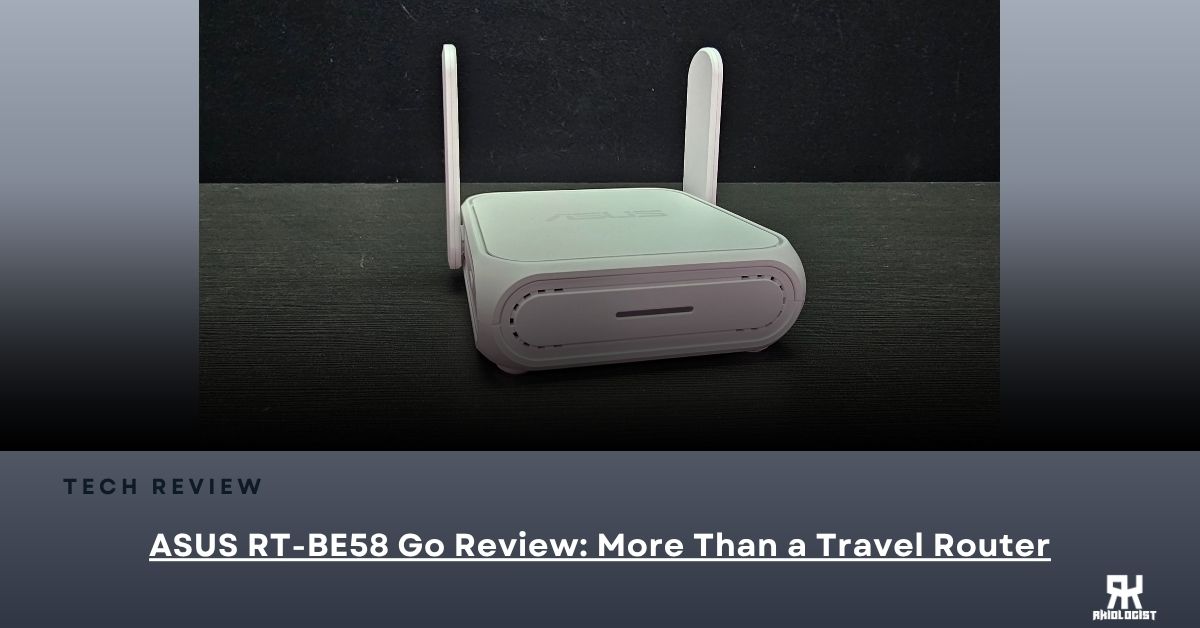
Many people may not know about travel routers, as we usually connect our devices directly to hotel or public Wi-Fi. However, if you travel often or work remotely, a travel router can simplify your experience. The ASUS RT-BE58 Go is a new travel router that supports the Wi-Fi 7 standard. Unlike larger ASUS routers meant for home use, this compact model is designed to fit in your bag while still providing useful networking features.
Luckily, ASUS sent us their ASUS RT-BE58 GO Router to test it and see how beneficial this router is for travelers who work from home wherever they are, even if they are not in the convenience of their home.
Specifications:
| Network Standard | IPv6, IPv4 WiFi 7 (802.11be), WiFi 6E (802.11ax), WiFi 6 (802.11ax), WiFi 5 (802.11ac), WiFi 4 (802.11n) IEEE 802.11g, IEEE 802.11b, IEEE 802.11a |
| Product Segment | BE3600 ultimate BE performance : 688+2882 Mbps |
| WiFi Data Rate | WiFi 7 (802.11be) (5GHz): up to 2882 Mbps WiFi 7 (802.11be) (2.4GHz): up to 688 Mbps |
| Antenna | External antenna x 2 |
| Transmit / Receive | 5GHz 2×2 2.4GHz 2×2 |
| Processor | 2.0 GHz Quad-core |
| Memory | DDR4 RAM 1GB;Flash 256MB |
| Operating Frequency | 5 GHz 2.4 GHz |
| Operating Mode | Public WiFi Mode (WISP) Repeater Mode Media Bridge Mode Access Point Mode Range Extender Mode AiMesh Node Mode Wireless Router Mode |
| I/O Ports | 2.5Gbps WAN X 1 1Gbps LAN X 1 USB-A for mobile tethering X 1 USB-C for power X 1 2.5Gbps WAN X 1 1Gbps LAN X 1 USB-A for mobile tethering X 1 USB-C for power X 1 |
| Buttons | Reset Slide Switch |
| Power Supply | 12V/2A, 9V/2A |
| Product Weight (g) | 232g |
| Product Dimensions | 99 X 111 X 36mm |
| AiMesh | AiMesh • Primary AiMesh Router • AiMesh Node |
Closer Look


The packaging comes in a gray and black box. It showcases some of the features and the hero model of the router.

Inside the box, you’ll find: the router, a power adapter with different adapters, a quick start guide, and the other documents needed for setup.


The design is simple and clean. There are no large antennas sticking out like you would normally see on gaming routers. Since this router is designed for traveling, ASUS kept it compact without removing the important features.

At the front you will find an LED Indicator. It will tell you the current status of your router if its searching, connected or disconnected to the Wi-Fi. Also, you can power this router using a power bank or outlet.

At the back, you’ll find a 2.5GbE WAN port, a Gigabit LAN port, a USB port for mobile tethering, and the power connector. It may not have as many ports as a home router, but it’s more than enough for its intended use.

At the side, you will find the Multi-Function Button. By default, this doesn’t have any function at all. But if you configure it, you will be able to have two router options, like, for example, Home and Travel modes, so any configurations you save for both modes will just be one toggle away.
User Interfaces
ASUS ROUTER APP


You can simply configure your router by downloading ASUS Router App. I have an Android phone, and I downloaded it from the Google Play Store. It is a very useful application that is able to configure one’s router and use many features at its disposal.
The app lets you change your Wi-Fi name and password, check connected devices, create a guest network, and manage other basic settings. If you’re new to ASUS routers, you’ll probably find the app the easiest way to get everything running.
ASUS WEB USER INTERFACE


In case you prefer to configure your router the traditional way rather than through the mobile app, ASUS has a solid web interface. This gives you direct access to set up your router and also alter the settings you may need to activate or configure according to your requirements. Also, this will allow you to configure the Multi-Function Button.
User Experience

Before using the RT-BE58 Go, I thought it was just a travel router that you only bring on vacations. But after spending some time with it, I realized it’s much more versatile than that.
During my testing, I used it at home, and it worked just like a regular Wi-Fi router and extender. I connected it to my internet connection and was good to go.
One feature I like is USB tethering. Instead of connecting each device to my phone’s hotspot individually, I just plugged my phone into the router. Instantly, my laptop and other devices were all sharing the same 5G connection.
The feature that really stood out to me, though, was Public Wi-Fi Mode.
When I travel for events like Computex or stay in hotels, I usually carry several devices with me. That means connecting my phone, laptop, tablet, and other gadgets to the hotel’s Wi-Fi one by one. It works, but it gets repetitive every time I move to a different hotel.
With the RT-BE58 Go, I only needed to connect the router to the hotel’s Wi-Fi once. After that, every device automatically connected to my own Wi-Fi network.
It may not sound like a huge deal on paper, but after using it, it’s one of those features you quickly learn to appreciate.
Conclusion
The ASUS RT-BE58 GO is not a router that everyone needs or wants. If you don’t travel frequently and only use your home internet, the router provided by your ISP is probably enough.
But if you are a digital nomad that always travels for events or an employee who works from home, even if you are really not home, then getting the RT-BE58 GO is a device you will surely need. Especially if you want protection from possible problems you will face using the public Wi-Fi of a hotel, mall or even a coffee shop.
One of the biggest advantages for me is the convenience of connecting all of my devices in one go rather than connecting them one-by-one. I just need to connect the router to the public Wi-Fi and I’m done; I am already connected to the internet.
Though some may point out that the router is redundant if you will use the tethering feature. I get their point; mobile devices now, unlike before, can handle mobile tethering much better, as it won’t drain the battery that fast. So, making this router accept a SIM card and have its own embedded battery would be a better upgrade or inclusion.
Also, some devices other users use may not be able to fully utilise everything a Wi-Fi 7 can offer. But at least your possible future upgrades can use it. This router is not perfect, but it can solve some problems travellers can face.
Overall, the ASUS RT-BE58 GO is not a device that will make everybody want it. But some people may need it, especially during their travels, as it is a simple and practical router that is reliable for having a protected internet connection on the go.
As of now, there are no SRP provided by ASUS as it will arrive in PH by Q3 or Q4.
With that in mind, the ASUS RT-BE58 GO receives the Editor’s Choice award.

PROS:
- Small and Easy to carry
- Supports Wi-Fi 7
- USB Mobile Tethering
- Easy to set up
- Multiple operating modes
CONS:
- No Sim Card Slot
- Still needs an External Power

Leave a Reply