
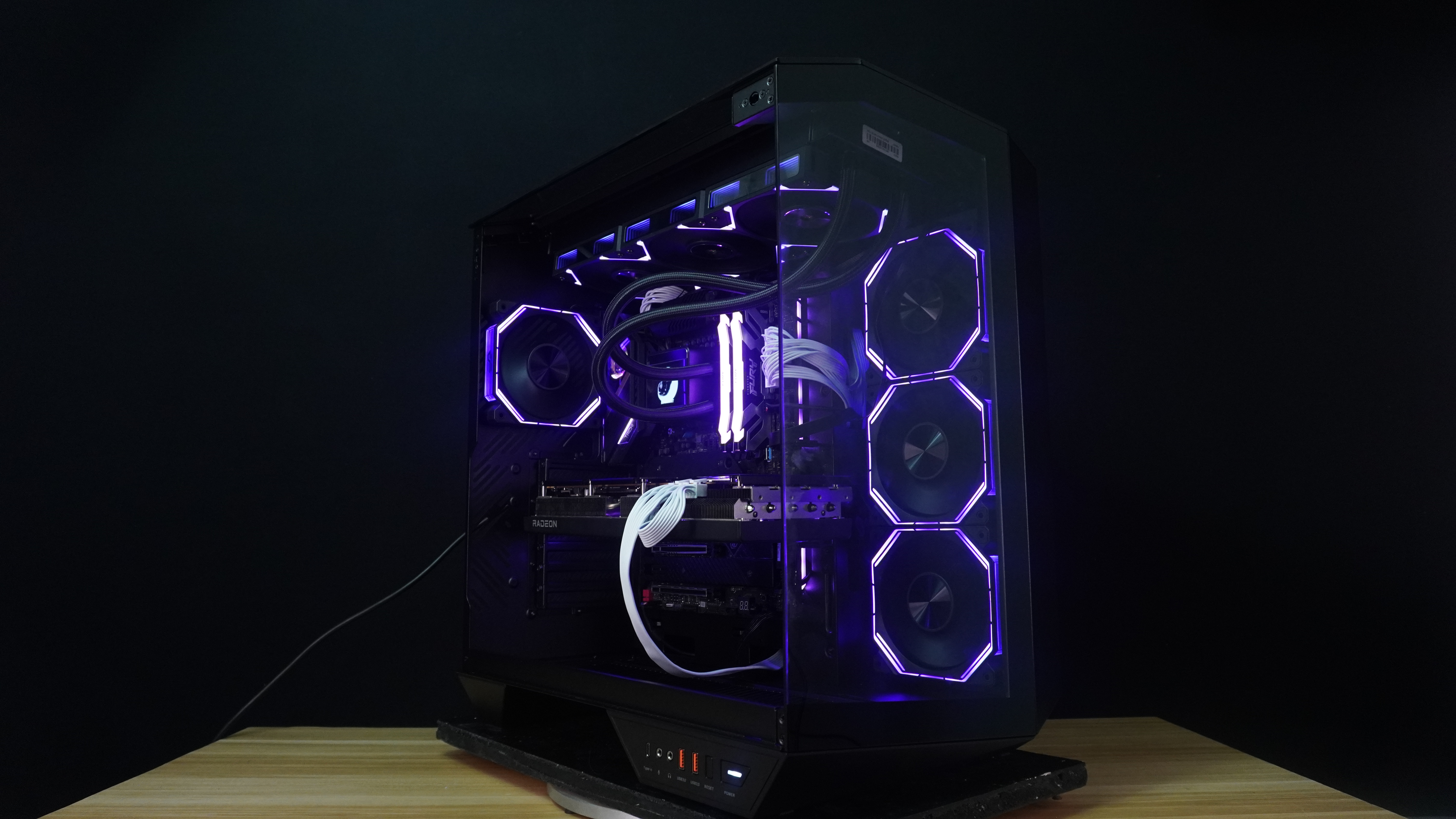
The panoramic dual-chamber PC case is a step in presenting hardware with class. It is a design where aesthetic appeal and practical utility are equal priorities. It is chassis with a lavish configuration for the dual-chamber configuration that separates components to optimize airflow and make cable organization much easier.
Today, we gonna review one of the newest cases from darkFlash that was showcased during Computex 2024 last June. The darkFlash ARCEE DY470 Case.
Specifications:
| Motherboard Support | ATX, M-ATX, ITX |
| Case Material | 0.7mm SPCC |
| Compatibility & Clearance | Max GPU Clearance: Horizontal : 410mm / Vertical : 390mm PCIE Slot:7 Max CPU Cooler Clearance:175mm |
| Dimensions | Height:497mm Width:298mm Depth:473mm |
| Fan Support | Top:120mm*3 Side:120mm*3 Rear:120mm*1 Bottom:120mm*3 |
| I/O | I/O:USB3.0*2 Type-C*1 HD Audio Reset Power |
Closer Look


The packaging comes in a brown box with some of the features of the case.


The darkFlash ARCEE DY470 Case I received comes in black color. It also comes in white. It has three tempered glass panels at the front and a metal with mesh back panel at the back.


The case comes with a small toolbox which is a nice touch. It contains the case screws, cable tiles, a motherboard speaker and a microfiber cloth to clean the tempered glass.


All of the tempered glass are secured to the case with screws.

The front side tempered glass is also secured using a latching system to lock it in place.

Once you remove the tempered glass, you can finally access the insides of the case. This case allows motherboards from ITX up to ATX. Sadly, this case cable holes don’t have any rubber grommets.


Also, this case supports, BTF motherboards or motherboards where the headers can be found at the back.


The case has four pre-installed ARGB Fans which is nice touch. All of the sides where you can install a fan only allows a 120mm in size. The front and side can support three 120mm fans and a max of 360mm radiator. Technically, you can put a 360mm radiator at the bottom but darkFlash only recommends putting three 120mm fans there.

The case has 7 expansion slots and each of the slots are modular.


The back side panel is being held by two screws and use a latching system to stay in place.


Once you remove the back panel, you will a cable cover panel inside which helps you hiding your cables to make it neater and pleasing.


This cover is being held by two screws located at the top and bottom.

As this is a dual-chamber case, it is typically normal that it has a big space at the back for your cable management needs.


There are enough cable ties holes at the back and there are pre-installed velcro straps to route your cables.


The case can fit one SSD or two HDDs. For the power supply it can fit up to 200mm wide ones.


At the top, this panel is removable and has a dust filter on it. You need to remove this if you are planning to install fans or a radiator.

What most people like nowadays is to find the I/O port at the front bottom side of the case. This case has USB 3.0 Type-C Port, a Mic and Audio Port, two USB 3.0 Type-A Ports, the reset button and the power button.


At the bottom of the case is a quick-release dust filter that prevents dust going inside from below.


The fans included are the INF34 Series Fans one with standard fan blade and three with reverse fan blades. These fans allow you to manage less cables as they can be interconnected and use a single cable only.
Benchmarks
For benchmarking, I will use Cinebench 2024 and AIDA 64. To get the data, I will use HWiNFO64.
Here are the specs of the components I will use for testing.
Specifications:
ASRock Z690 TAICHI
Intel i5 13600KF
SEGOTEP KUNLUN MU-360 ARGB
Kingston NV2 M.2 SSD (1TB)
Kingston Fury Renegade DDR5 RGB (32GB) 6400 MT/s
FSP VITA GM 850W
PowerColor RX 7700 XT Hellhound
Results


Conclusion

Seeing this case during Computex 2024, I was interested in reviewing it, and I was curious to find out what’s the difference between this case and other panoramics that are already out there in the market.
Though to find out, there’s no such big difference between them mostly it will just a little bit of adjustment or adding a different style to the case with this ARCEE DY470 its just some added features like three tempered glass was added to the case, the graphics card support and the partition cover plate that most of the brands doesn’t put it.
Don’t get me wrong, the case is good and has lots of good features, and it’s likeable to be honest. As this can showcase your components and your RGB lighting pretty well. Plus, the addition of 4 ARGB snap-on Infinity Fans adds value to this case.

Design wise, it is durable, and the motherboard tray doesn’t bend easily, unlike other Chinese brands of cases where one small push will bend it. Also, it allows a BTF motherboard for a cleaner and neater look of your overall build.
Performance wise, based on the temperature results, it is performing well for a dual-chamber case. The airflow is good, and it can easily get out of the case.

Cable management is also pretty good. Even you are not that good in managing your cables you can just hide it using the cover and it will look nice and neat.
If there are things to nitpick here, one of them will be the positioning of the cable tie routes. As it is directly above the cable holes going to your components.


Second will be the GPU support, which is not good for graphics cards like this tri-fan card from PowerColor as it will block the fan from spinning.
Overall, the darkFlash ARCEE DY470 is a good case with good design, durability, and pleasing aesthetics. It has a big footprint, but I know you are already aware of the typical ATX, Panoramic Dual Chamber Case size.

You can buy the darkFlash ARCEE DY470 for around P5,600.00 pesos at your nearest darkFlash online and physical stores.
With that being said, the darkFlash ARCEE DY470 gets a recommendation award from RKiologist.

PROS:
- Four Pre-Installed ARGB Fans
- Back Cable Cover
- Aesthetically pleasing
- Big Allowance for CPU Air Cooler
CONS:
- Cable route is on top of the Cable Holes
- GPU Support can hit the fans



Leave a Reply