
Recently, Synology has expanded its product lineup with the introduction of the Synology BeeStation. This new offering is akin to the previously released BeeDrive but is designed as a Network Attached Storage (NAS) device with simplified configurations. The BeeStation is aimed at users seeking a personal cloud solution without the complexities involved in its setup. With this launch, Synology addresses the growing demand for easy-to-use, private cloud storage options.
I consider myself fortunate to have received the BeeStation from Synology for a review. My focus will be on evaluating its user-friendliness and performance capabilities. Specifically, I’ll explore the impact it has on my daily content creation workflow.
Specifications:
| Capacity | 4 TB |
| Processor | Realtek RTD1619B |
| Memory | 1 GB DDR4 |
| LAN Port | 1 x 1GbE RJ 45 |
| External Ports | 1 x USB A 3.2 Gen 1 port 1 x USB C 3.2 Gen 1 port |
| Product Dimensions (HxWxD) | 148.0 x 62.6 x 196.3mm |
| Weight | 820g |
| Power Recovery | Yes |
| Power Supply Unit / Adapter | 36 W |
| AC Input Power Voltage | 100V to 240V AC |
| Power Frequency | 50/60 Hz, Single Phase |
| Power Consumption | 7.85 W (Access) 1.65 W (HDD Hibernation) |
| British Thermal Unit | 26.79 BTU/hr (Access) 5.63 BTU/hr (HDD Hibernation) |
| Operating environment | Temperature: 0°C to 35°C 32°F to 95°F Relative humidity: 8% to 80% RH |
| Storage environment | Temperature: 20°C to 60°C 5°F to 140°F Relative humidity: 5% to 95% RH |
| Supported browsers | Google Chrome®, Firefox®, Microsoft Edge®, Safari® 14 and above |
| template.interface_languages | English, Deutsch, Français, Italiano, Español, Nederlands, Русский, Polski, Čeština, 日本語, 한국어, 繁體中文, 简体中文 |
| template.beestation_for_desktop | Windows 10 64-bit (build 19041 or above) Windows 11 macOS 12.3 or above |
| template.beephotos___beefiles_mobile_apps | iOS 15 or above Android 8 or above |
| Certifications | RoHS, FCC, CE, BSMI, RCM, EAC, UKCA, KC, VCCI |
| Package contents | 1 x BeeStation main unit 1 x AC power adapter 1 x RJ 45 Ethernet cable 1 x Quick start guide |
| Warranty | 3 years |
Closer Look


The packaging comes in a plain cardboard box as what Synology really known for.


Additionally, the product includes a sticker label and featuring bullet-pointed information detailing the specifications and contents to expect.

Upon opening the box, you will discover several small cardboard compartments that neatly store the contents.

Inside the packaging you will find the RJ-45 Ethernet Cable, Quick Start Guide, AC Power Adapter and the BeeStation unit itself.


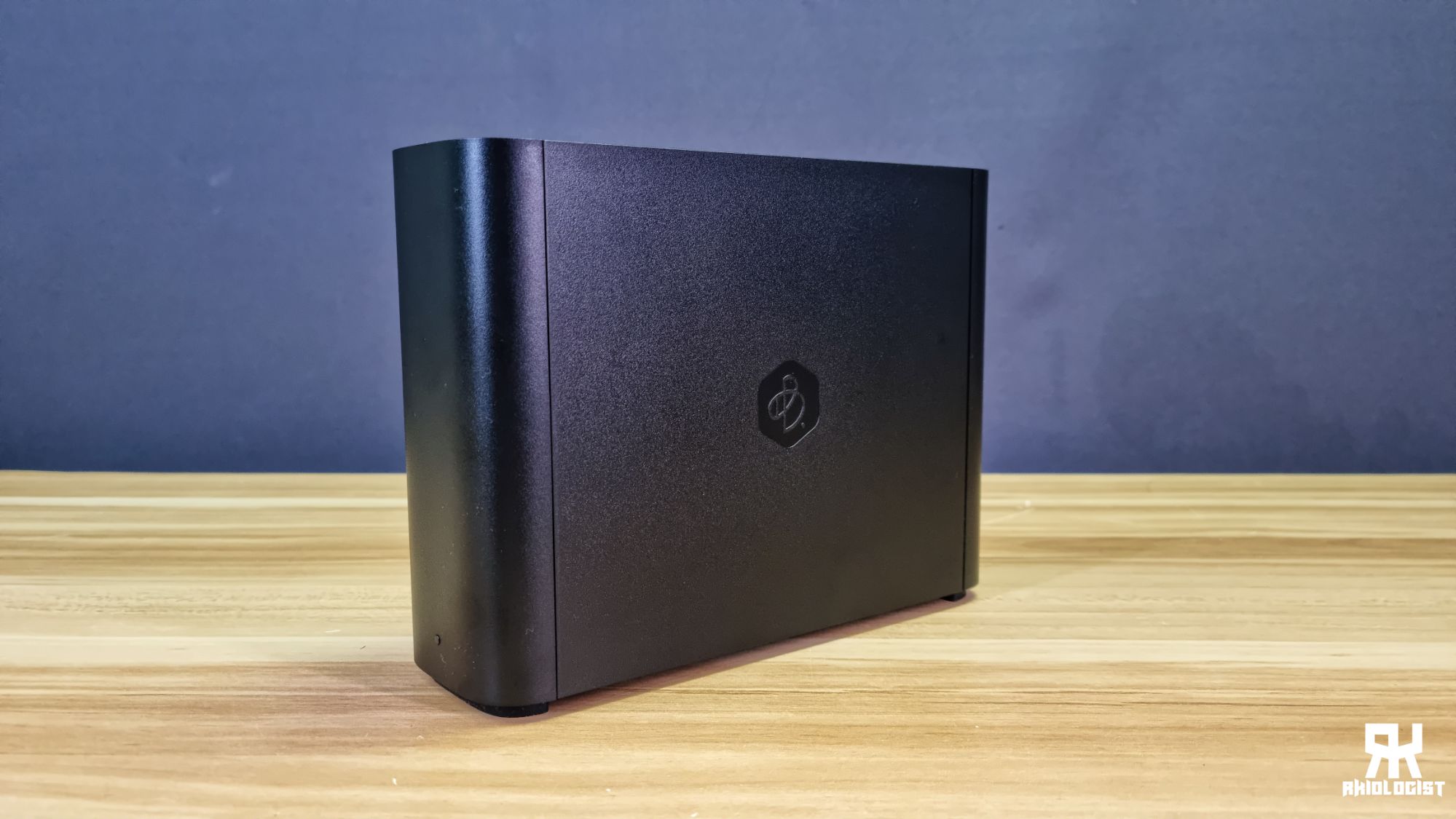
The BeeStation boasts a sleek, minimalistic design with a stealthy appearance. Currently, it is available exclusively in black, featuring the distinctive Bee logo on each side.

Compared to the NAS you will find at your local stores. The BeeStation has a smaller footprint and doesn’t take up some space on your table or on the area where you plan to put it.

At the rear, you will find the Power Port, Enthernet Port (1GbE), USB 3.2 Type C Port, USB 3.2 Type A Port and the Power Button.


The design includes cut-outs on the top and bottom for ventilation, and the bottom also displays the MAC Address, Serial Number, and QR Code. For security reasons, these details are intentionally concealed to protect my BeeStation from unauthorized access.
Setting it Up

You need to plug the BeeStation to the Internet and Powering it up. After that you are ready to setup the BeeStation.

When you will see the LED breathing with White Color it means it is powering up and initializing to be ready to be setup.

Once it goes orange, you are now ready to complete the setup by following the methods provided by Synology.


Synology will give you two options to set-up your BeeStation. Method 1 will be using your mobile phone and scanning the QR Code. Method 2 will be using your computer by entering the URL “portal.bee.synology.com/setup“.
After that you will just need to follow the instructions on how to complete your setup.
Software
BeeStation for Desktop


BeeFiles (Android)


BeeFiles offers a straightforward folder and file management system, augmented by the capability to synchronize cloud storage with BeeStation and facilitate NAS backups to external USB storage.
BeePhotos (Android)


The BeePhotos app is capable of organizing images by recognizing faces, objects, and locations, as well as other metadata. It also allows users to employ search terms to locate specific photos.
User Experience
Setting up the BeeStation is straightforward and quick, taking only a few minutes to establish your personal cloud if no updates are required. During setup, I encountered no issues and found it simple to add new members. These members can then view, upload, download, or manage the BeeStation from their own devices.
BeeStation’s simplicity is appealing, yet it would be beneficial for Synology to guide users through enabling SMB and LAN Access during the initial setup for added convenience. Although these features are disabled by default, providing instructions for activation would be particularly helpful for those new to such devices or products.
Conclusion
The Synology BeeStation primarily serves as an economical substitute for cloud services such as Google Drive or Dropbox. It boasts a user-friendly setup and operation, with capabilities to automatically back up and sort files.
But if you are looking for NAS like features, then the BeeStation is not for you. The biggest trade-off of this product is that it doesn’t do the advanced functionalities of a NAS, and this is just what I can says is a basic NAS for dummies. Though this device will let you store, access and share your data through the web or mobile app anywhere. It really has limitations, and you can’t have it all.
A notable drawback of the BeeStation is its lack of an additional hard drive slot for storage upgrades. In contrast to other NAS systems that offer easy plug-and-play hard drive replacement, the BeeStation does not support this feature. Consequently, should the hard drive fail, there is a risk of losing all stored data.
Considering BeeStation as your cloud server could be economically beneficial, as it requires only a one-time payment, unlike other cloud services such as Google Drive or Dropbox that operate on monthly or annually subscription models. This can be particularly advantageous if you possess a substantial amount of data to store, as I do with my numerous videos and files necessary for content creation.
The Synology BeeStation stands out for its user-friendly setup process, accessible even to novices simply by following the user manual or scanning the provided QR Code. It serves as an excellent substitute for traditional cloud services, though one must be mindful of the hard drive’s durability due to potential data loss risks.
The Synology BeeStation is available for approximately P16,540.00 pesos or $280.00.
Consequently, the Synology BeeStation earns a ‘Must-Have’ award, as a good purchase for those seeking a personal cloud storage solution.

PROS:
- Has a software for both PC and Mobile
- Can be access through Web Browser
- Compatible for PC, Handheld Devices and Mobile Phones
- Easy to setup
CONS:
- Storage Limitation only up to 4TB.
- Needs different apps on mobile
- Needs lots of sign-ups for mobile
- SMB and LAN Access are off by default and no instructions during initial setup

Leave a Reply