
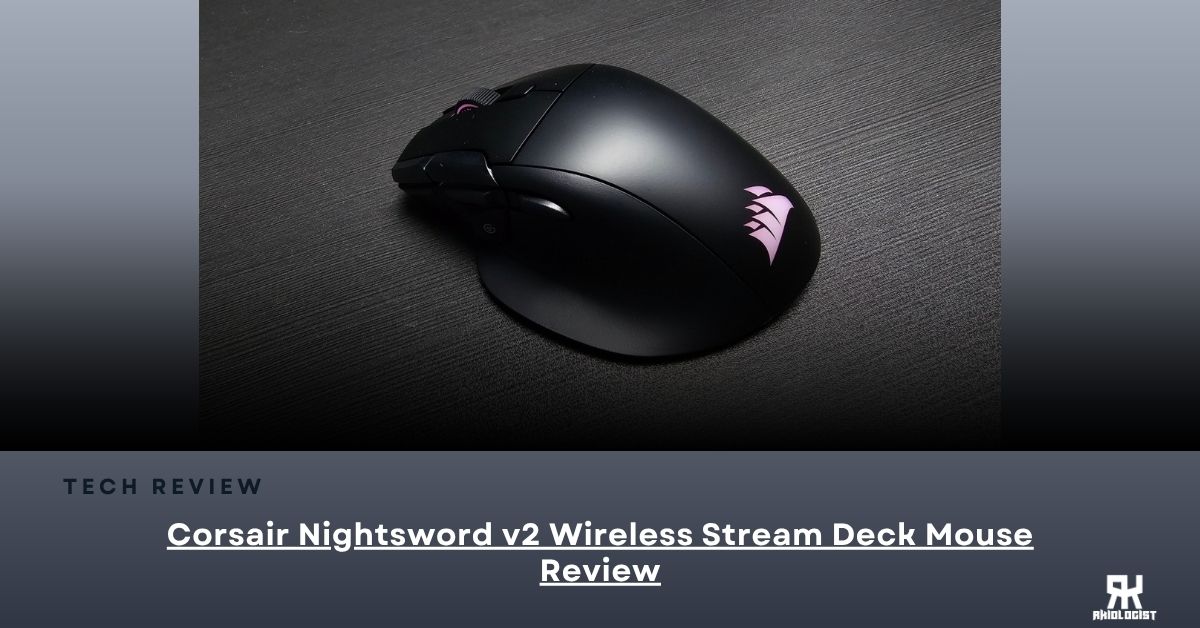
Corsair has been making gaming mice for quite some time. One of their more recognizable models is the NIGHTSWORD, and it focuses on ergonomics and extra controls.
Now, Corsair has introduced a new version called the NIGHTSWORD v2 WIRELESS SD. This time, Corsair added something different to the mouse: a dedicated Stream Deck Launch Button that can bring up a Virtual Stream Deck directly on your screen.
In this review, we’ll take a closer look at Corsair’s latest gaming mouse. We assess whether the Stream Deck functionality makes it more useful, or if it is just a premium feature.
Specifications:
| Weight | 89g |
| Connectivity | Wireless / Bluetooth / Wired |
| Sensor Type | Optical |
| Sensor | CORSAIR MARKSMAN S |
| Battery Life | Up to 170 hours at 1KHz with RGB off |
| Cable | 1.8M/ 6ft Braided Type C to A cable |
| Dimensions | 130 x 78 x 41mm |
Closer Look


The packaging comes in the usual-colored yellow and black box, the signature of Corsair. On the front, you will find the NIGHTSWORD v2 WIRELESS SD hero image, together with some of the specifications and features that Corsair wants to highlight.

Inside, you will find the Corsair NIGHTSWORD v2 WIRELESS SD mouse, the wireless receiver, the wireless adapter, the USB cable, and the documentation.

At first look, the NIGHTSWORD v2 WIRELESS SD still follows the familiar ergonomic design of the NIGHTSWORD series. It is made for right-handed users and has a larger body compared to the ultralight gaming mice that are becoming common today.
The mouse has a black finish with the Corsair logo on the palm area, giving it the usual Corsair gaming look without making the design too complicated.
Like its predecessor, it has the standard left and right mouse buttons, the scroll wheel, and additional buttons around the side of the mouse.

But this is where the NIGHTSWORD v2 WIRELESS SD becomes different.
On the side of the mouse, you will find a dedicated button with the Stream Deck logo. Pressing this button will launch the Virtual Stream Deck directly on your screen.
This is basically the main selling point of this mouse.
Instead of having a physical Stream Deck sitting beside your keyboard, you can access a virtual version directly from the mouse. You can create different shortcut panels for games, applications, streaming, or even normal productivity tasks.
The mouse also has eight programmable buttons that can be used with the Stream Deck ecosystem. This gives you more options for assigning different shortcuts without needing to reach for your keyboard.

At the front, you will find the USB-C port that can be used for a wired connection or for charging the mouse.

The USB-C to USB-A cable is braided and is very thick compared to the normal cables used on gaming mice.

The NIGHTSWORD v2 WIRELESS SD also comes with a wireless dongle. It has a clip on its back, which makes it easier to be clipped on the mousepad and doesn’t go anywhere.
User Experience

Going into my first experience with the NIGHTSWORD v2 WIRELESS SD, I was honestly more curious about the Stream Deck button than the mouse itself.
Using it for the first time, the Stream Deck button is actually pretty straightforward. Pressing it will bring up the Virtual Stream Deck on your screen, where you can access different shortcuts depending on the profile that you have configured.
For me, this is where the mouse starts to become more interesting. Instead of reaching for a separate Stream Deck or going through different menus, I can simply press the button on the mouse and access the shortcuts that I need.
You can also create different profiles depending on what you are doing. If you are playing a game, you can have shortcuts specifically for that game. If you are streaming or creating content, you can have another profile for applications such as OBS or Discord. The eight programmable buttons can also be configured to work with the Stream Deck ecosystem, giving you more options for assigning different shortcuts.
As for the actual mouse performance, the NIGHTSWORD v2 WIRELESS SD feels more like a traditional ergonomic gaming mouse compared to the ultralight mice that are becoming more common. At 89g, it is definitely not trying to compete with those extremely lightweight gaming mice, but that isn’t really what this mouse is designed for.
Software
Corsair Web Hub


For the software, you can only configure the mouse using the Corsair Web Hub. It is lighter than the iCUE software, which we usually use for other Corsair devices, but it is not bug-free. Though it, the greatest advantage is that it doesn’t take much space in your storage, as you can access or configure your mouse using the web.
The Stream Deck functionality, however, works together with the Elgato Stream Deck ecosystem. This gives you access to additional plugins and profiles that can be used with applications such as OBS and Discord.
You can adjust the DPI levels here with up to 5 step counts. Every DPI level has a dedicated color.
This makes the software side of the NIGHTSWORD v2 WIRELESS SD a little different compared to a normal gaming mouse.
You are basically using the Corsair Web Hub for the mouse itself, while the Stream Deck functionality connects you to the larger Stream Deck ecosystem.
Stream Deck


One of the main selling points of the NIGHTSWORD v2 WIRELESS SD is the Stream Deck button.
By pressing it once, I can display the Virtual Stream Deck on the screen and use various shortcuts that I have created. I am able to create different profiles based on what I am doing – if I am gaming, streaming, using different applications, etc.


I can utilize the plugins from the Elgato Marketplace that are compatible with applications like OBS and Discord, and at the same time the eight programmable buttons of the mouse can be programmed for the Stream Deck actions.
In other words, I do not need a separate Stream Deck next to my keyboard and have some of its actions on the mouse.
This feature seems quite interesting for those who already use Stream Deck.
Conclusion

The Corsair NIGHTSWORD v2 WIRELESS SD is not simply another gaming mouse with a higher DPI sensor and faster polling rate.
The main selling point of this mouse is the dedicated Stream Deck Launch Button.
Corsair has taken the idea of a Stream Deck and placed part of that functionality directly into the mouse. One button can bring up the Virtual Stream Deck, while the eight programmable buttons can also be used with the Stream Deck ecosystem.
For gamers who don’t need this type of functionality, the feature might not be that important. You can still use the mouse normally, but you are paying for something that you might not use.
For streamers, content creators, and people who use a lot of shortcuts, however, this can be a useful addition.
The other specifications are also not something to ignore. You get the MARKSMAN S optical sensor with up to 33,000 DPI, 8,000Hz polling, optical switches rated for 100 million clicks, and tri-mode connectivity.
The battery life is also one of the good points of this mouse. Corsair claims up to 170 hours of battery life when using 2.4GHz wireless at 1,000Hz polling with RGB turned off. Of course, using higher polling rates and RGB will affect the actual battery life.
Also, one thing that I noticed while using the NIGHTSWORD v2 SD is that you can sometimes run into detection issues. There are times when Stream Deck doesn’t recognize the mouse properly, which can be a bit of a problem, especially when you need to use the Stream Deck functions.
When this happens, I usually have to restart either the mouse or Stream Deck itself before it detects the NIGHTSWORD v2 again.
But then again, it all comes down to pricing.
By the time of writing this review article, the Corsair NIGHTSWORD v2 WIRELESS SD Stream Deck Gaming Mouse is priced at $129.99.
At this price, Corsair is asking you to pay for the additional Stream Deck functionality on top of the gaming mouse itself.
If you don’t need the Stream Deck feature, there are other gaming mice that can give you the same high-end sensor, wireless connectivity, and high polling rate without paying for this additional ecosystem.
But if you are someone who can actually take advantage of the Virtual Stream Deck and the additional programmable buttons, then the NIGHTSWORD v2 WIRELESS SD becomes a much more interesting option.
With this, the Corsair NIGHTSWORD v2 WIRELESS SD Stream Deck Gaming Mouse receives the Recommended Award.

PROS:
- Dedicated Stream Deck Launch Button
- 8 programmable buttons
- Tri-Mode Connection
- CORSAIR Web Hub
CONS:
- Corsair Web Hub is buggy sometimes
- Stream Deck functionality may not be useful for everyone
- Premium pricing


Leave a Reply